My simple .dat importer for Sketchup is now avalable on bitbucket.
It is very "prototype", but is still useful if you want to get difficult LDraw (Lego) parts into SketchUp.
This plugin could do a lot more, but I don't find a lot of time to work on it; which is why I create the bitbucket repo.

My SketchUp Plugins list, and blog about the world of plugins for SketchUp.
Showing posts with label ldraw. Show all posts
Showing posts with label ldraw. Show all posts

Small Lego Gallery
I created these images while writing the ldraw importer - sort of as a "screen test" for Lego parts in SketchUp. Nothing terribly interesting, but there they are.
I was going to post the model also, but I seem to have lost it. Oh well, here's Obi Wan and Luke's Landspeeder:
Importing Lego Sets in SketchUp

Little House, Dormer Build Sheet
This is a contact sheet built from images exported from A SketchUp model. The model is not mine and was importer using my SketchUp LDraw importer plugin. The plugin uses the STEP command in the LDraw file to create a new SketchUp::Layer for each Step.
With all the Layers in place, Scenes can be automatically added, and animations created using SketchUp's built-in animation features.
Model: Little House, Dormer

Lego (LDraw) Build Instructions in SketchUp
I've been playing around with Legos in SketchUp (again). I've added some cool features to the importer - like creating build steps on import, and color coding each step. Each step also gets its own Layer, so you can toggle them on/off as you like. I hope soon it will be possible to create high-quality build instructions right from SketchUp.
The exporter works alright the way it is, but I'm working on incorporating the same build-step system into that. The user would need to create a Layer for each Step in the build.
Once that is done, you should be able to use SketchUp for the entire lego design and build process. The exporter is LDraw compatable, so you can load the output into any other LDraw software you use.
I have some ideas about lego-specific tools for placing and rotating parts, but we'll see how that goes...
The updates are not ready yet, but hopefully soon (a week?)
The exporter works alright the way it is, but I'm working on incorporating the same build-step system into that. The user would need to create a Layer for each Step in the build.
Once that is done, you should be able to use SketchUp for the entire lego design and build process. The exporter is LDraw compatable, so you can load the output into any other LDraw software you use.
I have some ideas about lego-specific tools for placing and rotating parts, but we'll see how that goes...
The updates are not ready yet, but hopefully soon (a week?)
Lego Minifig Image

Nathan got me started on my old LDraw lego importer, which got me looking at the plugin again. It's not bad, but there's always room for improvement.

Here are some great .ldr files to import.
Plugin: ldraw.rb
The ldraw.rb can import ldraw.org .dat files.
The ldraw format does not lend itself well to SketchUp. In a nutshell, ldraw was developed at a time when parts were created in a text editor by hand. So to make that easier, dozens (if not hundreds) of primitives were created upon which parts were built. So when you load an ldraw part into SketchUp, the parts are pretty heavy with nested components and duplicate edges. I might add an option to "explode primitives." That would create a single component per part, and take care of duplicate edges.
Another major problem is face orientation. Faces are drawn arbitrarily facing in or out.
Yet, if you need a complex part that already exists in ldraw, this plugin can be a time saver.
Download ldraw.rb
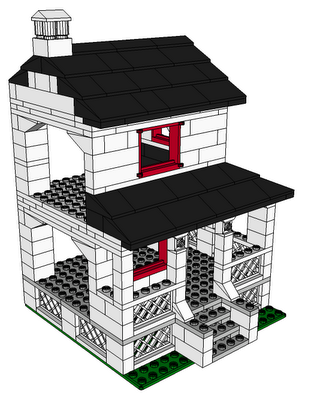
House With Porch by Jeff Stebel
The ldraw format does not lend itself well to SketchUp. In a nutshell, ldraw was developed at a time when parts were created in a text editor by hand. So to make that easier, dozens (if not hundreds) of primitives were created upon which parts were built. So when you load an ldraw part into SketchUp, the parts are pretty heavy with nested components and duplicate edges. I might add an option to "explode primitives." That would create a single component per part, and take care of duplicate edges.
Another major problem is face orientation. Faces are drawn arbitrarily facing in or out.
Yet, if you need a complex part that already exists in ldraw, this plugin can be a time saver.
Download ldraw.rb

House With Porch by Jeff Stebel
Subscribe to:
Posts (Atom)
Popular Posts (Last 30 Days)
-
 Sketchup materials library of 12x12 vinyl floor tiles. Download download
 -
Dec 18, 2010 - TIG just released a new .obj exporter. TIG's plugins are usually solid, so I recommend trying TIG's. ( TIG's OBJe...
-
 Apr 2014 * Renamed to MoveIt , and available in t SketchUcation Plugin Store Aug 16, 2009 * Released update fixing possible bugsplat...
 -
This SketchUp script assists the user in flattening, or unfolding, 3d objects onto a 2d plane. Installation Download unfoldtool.zip . M...
-
 2010-09 * Updated for small bug in placement in SketchUp 8. toolbars-2010-09.zip This is an update to Custom Toolbars plugin with t...
 -
 The Construction Line Tool allows you to draw constructions lines in a similar way as the Pencil Tool. Toolbar: View > Toolbars >...
 -
 This is the first step in a greeble plugin. And by first step I mean there are possible bugs. Protrude performs 4 basic operations: div...
 -
 This importer lets you import both ASCII and binary STL files into SketchUp. It automatically detects the type of .stl file and imports acc...
 -
As you probably know, SketchUp 8 Free does not include the ability import/export DXF/DWG files. Although there are some free and commercia...
-
 Update Apr 2014 - Version 1.0.1 Add a Layer to your SketchUp model and control its visibility on existing and new Scenes. Use Activa...