Picking up where we left off last time, the past weeks have brought another slew of Sketchup plugins to the SketchUp community.
SU2POV 3.3
Didier Bur announced version 3.3 of his POV-Ray exporter for SketchUp: SU2POV.
Vertex Tools 1.0.0
Thomas Thomassen's first commercial Sketchup plugin, Vertex Tools, adds some great vertex/organic modeling capabilities to SketchUp. Visit Thom's site for details, documentations, and downloads.
Thom also released a free, experimental plugin called Component Comparison which "Compares components for geometric similarities - replaces the instances of similar definitions to use the same definition."
Twisted Torus & Menger Sponge
Regular Polygon continues releasing some very cool geometric plugins. This time with 2 new (and free) offerings for creating regular and twisted torus, and 3d fractal Menger Sponge. Visit the Regular Polygon blog for details and downloads.
Light Up 1.9
LightUp version 1.9 was released earlier this year and it included a time-saving, built-in IES browser. Along with 1.9, LightUp Player was released. LightUp Player is a stand-alone program that lets people view your LightUp files without them needing to own the full version.
Also on the LightUp pages is a tutorial video showing how to add an animated flame in LightUp. See LightUp's resources page for that, and more LightUp tutorials.
LightUp's developer, AdamB, also posted a little plugin called Scene Tweaker, that "allows you to quickly tweak the position and orientation of Scene Cameras." Check it out on Sketchucation Forums.
Google Spreadsheet Link Plugin
morisdov released a plugin that can link a model's attributes to a Google Docs Spreadsheet. Visit morisdov's plugin site for information and download. And if you're interested in object animation in Sketchup, be sure to check out his "proper animation" plugin which lets you easily animate objects between Scenes.
Wudworx Board Maker
Wudworx has released their 3rd woodworking plugin for SketchUp. Board Maker makes making boards about as easy as it gets. Board dimensions can be precisely entered, and the boards are added to the model as Components for re-use. Wudworx's other plugins include a Dovetail and a Mortise & Tenon plugin.
sahi's plugins
Sketchucation member sahi posted 2 new plugins. One is called Copy Brick and is an on-screen tool for transforming components as you place them in a model. The 2nd, Create Image (rotate) exports a set of images of a model which can then be sewn together to create an animated fly-around; very similar to the Web Exporter released by Google.
TIG's plugins
TIG released 2 new plugins: Gradient Tools which adds text tags to faces and edges showing their gradient; and Fix Reversed Face Materials which helps fix back-faces facing outward as well as fixing materials applied to the wrong side of faces.
gavvy's plugins
SCF member gavvy released a plugin that toggles all of your toolbars between visible and invisible. It goes by the name Show and Hide your Toolbars. Note it's all or nothing - you don't get to choose which toolbars are toggled.
That's all for now, thanks for reading.

My SketchUp Plugins list, and blog about the world of plugins for SketchUp.

New and Updated SketchUp Plugins
A lot of new and updated plugins posted in the past couple of weeks. All of these are from the Sketchucation Forums.
Regular Polygon posted a new Superellipsoid plugin for drawing (you guessed it) superellipses. Also note his Sphere plugin has been updated to version 1.1, and Superellipse to 1.2.
Thomas Thomassen released 3 new plugins:
WudWorx has release their 2nd sketchup woodworking plugin for drawing mortise and tenon joinery. Their Dovetail plugin being the first.
sahi has posted a plugin Group in Component to create a single Component from multiple copies of a Group.
FTPlus posted an exporter for T3D format. T3D is a format used by epic's 3d engines. Currently only UEd2(Unreal edit) is supported (UT99 e.g.).
Fredo posted a stand-alone script for making curved ramps called CurviShear. In addition, Fredo's beta plugin Curviloft for lofting and skinning has been updated to version 1.0b.
Didier Bur updated his popular Cloud plugin for importing and exporting point clouds in CSV format. Support has been added for DEM files, setting units, layers, and documentation. Not to mention his Ruby Library Depot has been completely updated.
TIG posted a command-line Camera plugin which includes several commands for setting Axo and Iso views.
c.plassais released a plugin for creating colored edges and dotted lines.
kyyu posted a plugin for creating slots for tabs. kyyu is a regular on the phlatforum where he writes sketchup plugins geared towards using SketchUp for 2.5D & 3D CNC design.
Finally, I posted an index of plugins on the Plugins Forum to help folks find and discover a few of the plugins which have been posted on Sketchucation.

Regular Polygon posted a new Superellipsoid plugin for drawing (you guessed it) superellipses. Also note his Sphere plugin has been updated to version 1.1, and Superellipse to 1.2.
Thomas Thomassen released 3 new plugins:
- Groups to Components - bulk conversion of Groups to Components.
- SuperGlue - Quickly stick GlueTo components back to the faces they lie flush with, or use solvent to release them. Simply click and sweep across the faces and components.
- Draw BoundingBox - Draws a box from the selected Group/Component. Skewed instances supported.
WudWorx has release their 2nd sketchup woodworking plugin for drawing mortise and tenon joinery. Their Dovetail plugin being the first.
sahi has posted a plugin Group in Component to create a single Component from multiple copies of a Group.
FTPlus posted an exporter for T3D format. T3D is a format used by epic's 3d engines. Currently only UEd2(Unreal edit) is supported (UT99 e.g.).
Fredo posted a stand-alone script for making curved ramps called CurviShear. In addition, Fredo's beta plugin Curviloft for lofting and skinning has been updated to version 1.0b.
Didier Bur updated his popular Cloud plugin for importing and exporting point clouds in CSV format. Support has been added for DEM files, setting units, layers, and documentation. Not to mention his Ruby Library Depot has been completely updated.
TIG posted a command-line Camera plugin which includes several commands for setting Axo and Iso views.
c.plassais released a plugin for creating colored edges and dotted lines.
kyyu posted a plugin for creating slots for tabs. kyyu is a regular on the phlatforum where he writes sketchup plugins geared towards using SketchUp for 2.5D & 3D CNC design.
Finally, I posted an index of plugins on the Plugins Forum to help folks find and discover a few of the plugins which have been posted on Sketchucation.
SU2YafaRay: SketchUp Exporter for YafaRay

YafaRay forums memeber exvion has created an exporter to render Google SketchUp scenes with YafaRay.
[ SU2YafaRay forum | download the plugin ]
SketchUp 3D Basecamp 2010
2010 Google 3D Basecamp
September 1 – 3, 2010
Boulder, Colorado USA
Space is limited and spots are being filled by invitation. If you would like to attend but did not get an invitation, it may still be possible to get in. Google SketchUp product manager John Bacus explains in this sketchucation.com forum topic:
Here's the important part again:
[ 3D Basecamp Official Site ]
September 1 – 3, 2010
Boulder, Colorado USA
Space is limited and spots are being filled by invitation. If you would like to attend but did not get an invitation, it may still be possible to get in. Google SketchUp product manager John Bacus explains in this sketchucation.com forum topic:
Hi guys,
As always, enthusiasm for 3D Basecamp is high– both here at SketchUcation and with the SketchUp team at Google. I think we're going to have a great event again this year, and I look forward to seeing all of you that can make it. I appreciate the difficulty traveling to Boulder represents for those of you on the other side of the world, but we just couldn't swing an event in Europe this time around. We talked about it, but in the end we decided to celebrate our birthday at home here in Boulder.
Since there seems to be some uncertainty here on the invitation process, let me try to clarify. We are trying something a bit different this year. The idea was to invite a group of folks who we knew, and let them invite some people they knew, and so on until we filled up the available spots. Many regulars on this forum have been invited, and each of them can nominate ten more folks for the next wave of invites. Those folks have until the 13th of July to make their nominations.
So if you want to come, and you didn't get an invite yet... speak out here and ask for someone to nominate you!
john
Here's the important part again:
If you want to come, and you didn't get an invite yet... speak out here and ask for someone to nominate you!
[ 3D Basecamp Official Site ]
Regular Polygon Blog
Regular Polygon is a new Sketchup blog with the goal
Regular Polygon currently has 3 drawing plugins available: Ellipse, Superellipse and Sphere. They do pretty much what their names suggest, although each plugin allows for customization of the geometry through dialogs.
The plugins are free, although donations are accepted.
Keep an eye on [ Regular Polygon ]
to design and write creative Ruby plugins for SketchUp -- for free.
Regular Polygon currently has 3 drawing plugins available: Ellipse, Superellipse and Sphere. They do pretty much what their names suggest, although each plugin allows for customization of the geometry through dialogs.
The plugins are free, although donations are accepted.
Keep an eye on [ Regular Polygon ]
Plugin: Fredo's Curviloft 1.0a (Beta) Now Available
A Beta (functional although incomplete) version of Fredo's newest SketchUp plugin named "Curviloft" is available.
Curviloft is "just" another mile-stone in a line of several written by Fredo; some which include Round Corners, Tools on Surface, Fredo Scale, and Joint Push-Pull.
You will need to register at the sketchucation.com forums to get the download for Curviloft (and all Fredo's other plugins.)
Currently, only Loft by Spline is functional. Caution is advised when trying the other tools.
For complete Curviloft information from the author, visit this topic at sketchucation.com.
And now enjoy some stunning multi-media:
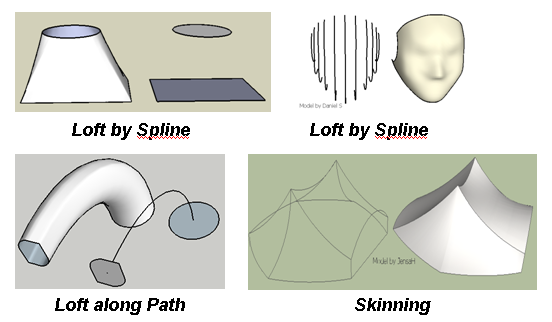
Curviloft Preview
Loft By Spline Tutorial
Curviloft is "just" another mile-stone in a line of several written by Fredo; some which include Round Corners, Tools on Surface, Fredo Scale, and Joint Push-Pull.
You will need to register at the sketchucation.com forums to get the download for Curviloft (and all Fredo's other plugins.)
Currently, only Loft by Spline is functional. Caution is advised when trying the other tools.
For complete Curviloft information from the author, visit this topic at sketchucation.com.
And now enjoy some stunning multi-media:
Curviloft Preview
Loft By Spline Tutorial
Shaderlight for SketchUp free Beta Software
Shaderlight is an integrated, interactive, photo-realistic renderer for Google SketchUp. Shaderlight lets you move objects or camera angles within a scene and see the results instantly as the image refines.
Features
link: [ Shaderlight ]
Features
- Interactive, progressive rendering that updates all changes in the Shaderlight render window
- Zoom and pan the rendered image
- Automatic material presets applied to the SketchUp material collection
- Material finishes controlled via the Shaderlight Material Editor
- Automatic lighting using SketchUp sun ,sky and shadow controlsImage based lighting (IBL) using preset or custom High Dynamic Range (HDR) images
- Change background setting with options for SketchUp background colour, IBL environment or custom background
- Simple quality setting to provide quick previews, or high quality final render
link: [ Shaderlight ]
Subscribe to:
Posts (Atom)
Popular Posts (Last 30 Days)
-
 Sketchup materials library of 12x12 vinyl floor tiles. Download download
 -
This SketchUp script assists the user in flattening, or unfolding, 3d objects onto a 2d plane. Installation Download unfoldtool.zip . M...
-
 2010-09 * Updated for small bug in placement in SketchUp 8. toolbars-2010-09.zip This is an update to Custom Toolbars plugin with t...
 -
 Apr 2014 * Renamed to MoveIt , and available in t SketchUcation Plugin Store Aug 16, 2009 * Released update fixing possible bugsplat...
 -
Dec 18, 2010 - TIG just released a new .obj exporter. TIG's plugins are usually solid, so I recommend trying TIG's. ( TIG's OBJe...
-
 Update 2010 Dec, 13 (Internal version 1.4) Menu: Draw/SphereTool Code cleanup, and generally tried to make it behave like a native SU Too...
 -
Flattery is a new, free SketchUp plug-in that can unfold models, adds tabs, and then export the pattern to a .svg file. One interesting feat...
-
 This importer lets you import both ASCII and binary STL files into SketchUp. It automatically detects the type of .stl file and imports acc...
 -
 This is the first step in a greeble plugin. And by first step I mean there are possible bugs. Protrude performs 4 basic operations: div...
 -
 Updated Dec 26, 2010 What are Plugins Beginning with version 4, SketchUp has shipped with an embedded Ruby-language interpreter allowi...