To promote the release of their new 3D printing plug-in for SketchUp, i.materialize is sponsoring a design challenge for SketchUp users.
You can submit any kind of house or building design, as long as you use Google SketchUp to create your 3D model. There are no limitations on your design ideas.
The winners will win a full color 3D printed scale model of their design - normally a $400 service.
[ Official Rules: Design Challenge ]

My SketchUp Plugins list, and blog about the world of plugins for SketchUp.

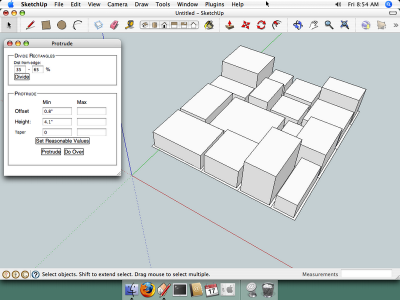
Update Protrude Plugin (now works on Mac)
My brother kindly gave me not one, but a pair of Mac G4 Cubes. They are a little aged, but work just fine and can run SketchUp 7, so are perfect for what I need them for - testing plug-ins. Thanks bro!
This update is re-written to work on both Windows and Mac operating systems, although nothing has changed for Windows users of the plugin so there's no need to re-install if you are using SketchUp on Windows.
I have tested this on 10.4, which I hope is "close enough" to the latest version.
See the protrude post for the download and information.
This plugin requires offset and progressbar from smuatard.com (both are free.)
This update is re-written to work on both Windows and Mac operating systems, although nothing has changed for Windows users of the plugin so there's no need to re-install if you are using SketchUp on Windows.
I have tested this on 10.4, which I hope is "close enough" to the latest version.
See the protrude post for the download and information.
This plugin requires offset and progressbar from smuatard.com (both are free.)
Hobby Vacuum Forming
Phlayboyz has come out with an inexpensive vacuum forming system starting at $99.
I've mentioned the phlatboyz cnc foam cutter (called the phlatprinter) in the past. It is made specifically for designing in SketchUp - there is a SketchUp plugin that exports a flattened (2d) model and outputs g-code for the phlatprinter.
The phlatformer is a great compliment to the type of modeling possible using the phlatprinter. This video shows Mark making a airplane fairing for strength and support. I imagine the former would work well for creating door and window elements to add detail to a building model, or for curved glass, or anywhere where you need a skin structure.
Information about the phlatboys machines can be found on their forum.
[ phlatboyz machine forum ]
I've mentioned the phlatboyz cnc foam cutter (called the phlatprinter) in the past. It is made specifically for designing in SketchUp - there is a SketchUp plugin that exports a flattened (2d) model and outputs g-code for the phlatprinter.
The phlatformer is a great compliment to the type of modeling possible using the phlatprinter. This video shows Mark making a airplane fairing for strength and support. I imagine the former would work well for creating door and window elements to add detail to a building model, or for curved glass, or anywhere where you need a skin structure.
Information about the phlatboys machines can be found on their forum.
[ phlatboyz machine forum ]
Flattery Papercraft Tools for SketchUp
Flattery is a new, free SketchUp plug-in that can unfold models, adds tabs, and then export the pattern to a .svg file.
One interesting feature is called Reunite Edges. It lets you reposition surfaces after unfolding without having to start over.
Flattery is available here: Flattery Papercraft Tools
One interesting feature is called Reunite Edges. It lets you reposition surfaces after unfolding without having to start over.
Flattery is available here: Flattery Papercraft Tools
Voodoo Camera Tracker SketchUp Importer
Chris Fullmer has written a cool SketchUp plugin that imports data from the VooDoo Camera Tracker, and allows you to integrate a SketchUp model into a video, or create a camera path based on a video.
SketchUp reads the data from VCT and creates a series of Scenes in SketchUp. Then you position your model, export the Scene animation, and finally combine the exported images with the video. Some third-party software will be required.
Have a look at the results:
[ SketchUp VooDoo Camera Tracker importer ]
SketchUp reads the data from VCT and creates a series of Scenes in SketchUp. Then you position your model, export the Scene animation, and finally combine the exported images with the video. Some third-party software will be required.
Have a look at the results:
[ SketchUp VooDoo Camera Tracker importer ]
Octane Render Commercial v1.02 beta2 Released
- New Platforms:
- x64 version for MS Windows
- Apple Mac OS X Native 32bit version
(x64 is not possible due to cuda toolkit constraints at this time)
- Daylight system with sunlight and physically based sky
- Material Channels:
- bump maps (also read from OBJ MTL file)
- normal maps
- opacity (alpha) maps (also read from OBJ MTL file)
- thin film coating maps
- OBJ and Mesh import:
- Option on mesh node to relink/reload a modified OBJ mesh, keeping materials by name.
- Use of smooth groups (option in OBJ prefs panel)
- Loading/Saving of OBJ import preferences
- Universal executable for all Geforce 8000 and up,
no more separate 8000 and 9000+ executables.
- Improved User Interface scheme
- Uses new Cuda 3.0 toolkit - with new drivers
- Better UI response while rendering on single GPU systems
- Linear and Logarithmic toggle buttons for easier control of many parameters
- HDR Images (OpenEXR and HDR) now take 50% space of video memory.
- Can Zoom the render viewport using CTRL + mousewheel.
- No more need for Visual Studio redistributable package installation.
Octane Render Commercial v1.02 beta2 Released
SketchUp Plugin: Sine Wave
Just a quick little plugin to draw a sine curve in SketchUp.
Draws a sine curve at the Origin and in a Group. User is asked for amplitude, length, and number of segments.
sine_wave.rb


Draws a sine curve at the Origin and in a Group. User is asked for amplitude, length, and number of segments.
sine_wave.rb
Subscribe to:
Posts (Atom)
Popular Posts (Last 30 Days)
-
 Sketchup materials library of 12x12 vinyl floor tiles. Download download
 -
This SketchUp script assists the user in flattening, or unfolding, 3d objects onto a 2d plane. Installation Download unfoldtool.zip . M...
-
 2010-09 * Updated for small bug in placement in SketchUp 8. toolbars-2010-09.zip This is an update to Custom Toolbars plugin with t...
 -
 The Construction Line Tool allows you to draw constructions lines in a similar way as the Pencil Tool. Toolbar: View > Toolbars >...
 -
 Apr 2014 * Renamed to MoveIt , and available in t SketchUcation Plugin Store Aug 16, 2009 * Released update fixing possible bugsplat...
 -
 This is the first step in a greeble plugin. And by first step I mean there are possible bugs. Protrude performs 4 basic operations: div...
 -
 This importer lets you import both ASCII and binary STL files into SketchUp. It automatically detects the type of .stl file and imports acc...
 -
Dec 18, 2010 - TIG just released a new .obj exporter. TIG's plugins are usually solid, so I recommend trying TIG's. ( TIG's OBJe...
-
 Update Apr 2014 - Version 1.0.1 Add a Layer to your SketchUp model and control its visibility on existing and new Scenes. Use Activa...
 -
All my plugins are listed on the My Plugins page for this blog.