Plugin: Manifold 2.2 for SketchUp

TIG continues to release great plug-ins at an amazing rate. Manifold is a SketchUp plug-in which...

looks at the contents of a selected group and tries to fix it so it is 'manifold' for 3D-printing etc.

The group needs to be a 3D shape which is fully surfaced without internal divisions or intraneous/extraneous geometry/entities...

When run...

It removes 'non-face/non-edge' entities.
It removes 'disconnected geometry'.
It removes 'unfaced-edges'.
It runs an initial 'health-check' and reports.
It removes face 'flaps'.
It heals 'holes'.
It removes 'internal faces'.
It orients all faces consistently to face 'outwards'.
It erases 'coplanar edges' [optional].
It 'triangulates' all of the faces [optional].
It highlights major errors.


Manifold is available via SketchUcation Forums

WWX Dovetails for Sketchup (wudworx)

Here's a new commercial ($18) plugin for creating dovetails in Sketchup.

The plugin does flat dovetail arrays, and also half blind and through dovetails for instant joinery. It uses a configurable set of parameters that keep their values between operations and also after SketchUp has been restarted.


WWX Dovetails for Sketchup (wudworx)

Modelur hotfix - 0.2.3

the Official Modelur blog: Modelur hotfix - 0.2.3: "We have just released a hotfix for Modelur. Due to a bug it was impossible to set plot area size and some of the normatives, which prevented Modelur to calculate all urban control values. This is fixed in newly released version of Modelur."

Video Made with Sketchup: James Bond Lego

Fun and expertly-produced video made using SketchUp and SketchyPhysics.

SU Podium V2 beta 2

Paraphrasing the information from multiple sources:

This is an interim release with another beta coming after in about 2 weeks. This beta is Windows only.

The V2 engine is multi-threaded. You also need a reasonable amount of RAM to hold 3d scene data. The more RAM you have, the more complex models you can render.

This build represents a stable code base where as far as we are aware, all features are working, although some may need some modification before final release. There will be additional features as well. V2 uses a new, higher-quality render engine. As a result, scenes set up in V1.x will not look the same in V2.


What's New
  • In beta2 there is an options dialog box which allows you to choose presets, resolution size for the rendered image, image file format (JPG/PNG/HDR) and Physical Sky vs SketchUp Sky. Point light soft shadows have also been added. Sun turbidity and exposure are controlled in the presets.
  • There are several pre made presets that have been crafted for certain rendering environments
  • With Beta_34you have the choice of resolutions size or matching the resolution size to the your SketchUp's viewport. You also have the option to choose PNG/JPG/HDR as image formats. We will be adding a option to allow you to save your images to a folder of your choice. Currently the images are saved to where the SketchUp model being rendered is located.
  • The Environment option allows you to choose between SketchUp background which could be plain background style or SketchUp Sky color or Podium's Physical Sky. When your SketchUp shadows are on, Podium Sun is on regardless of what background option has been chosen. Clay mode is currently not implemented. Sky turbidity (haziness caused by particles suspended in the atmosphere) and exposure are configured in the presets you choose. The preset files are plain text files which are editable. We will release a preset configuration guide.


Download and more @ su-podium.com

Sketchup Virtual Builder by Dstudio out of Beta

This page is reporting that beta testing is closed, and the plugin will be released soon.

Sketchup Virtual Builder Light plugin makes it possible to add Planning-Scheduling information to any Sketchup model and see the model being constructed in time, in Sketchup.

Sketchup Virtual Builder Light plugin can be used in any project as a way to determine and analyze an initial scheduling in an early phase.


Sketchup Virtual Builder by Dstudio: "Sketchup Virtual Builder Lightbeta"

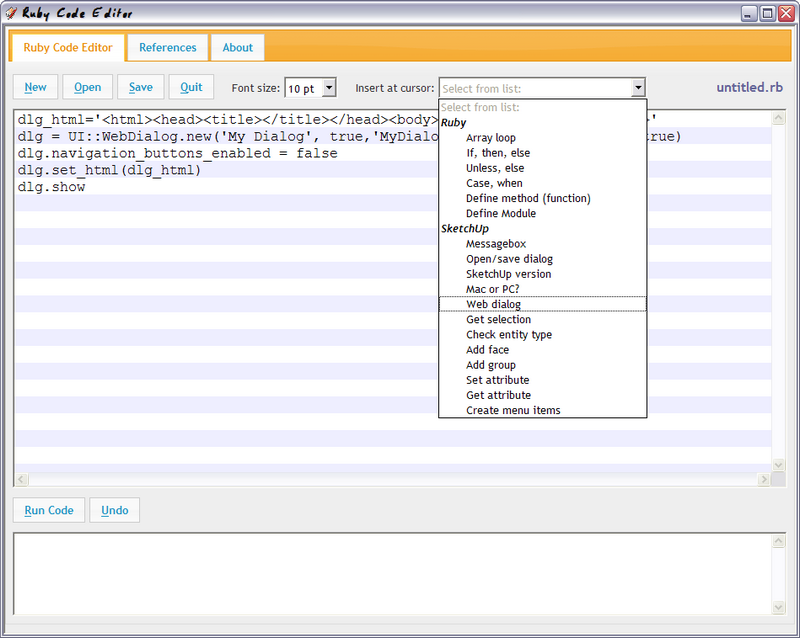
Plugin: Ruby Code Editor


Alex Schreyer released this Ruby Code Editor plugin.
This editor is an extension of Jim Foltz’s excellent Web Console plugin. Jim’s plugin opens within SketchUp, allows for code execution and captures compiler output. It also allows for opening and saving of code snippets.


At this point, this editor has the following features:

* Execute multiline Ruby code directly in SketchUp (from Web Console)
* Open and save files (from Web Console)
* Clean jQuery UI interface
* Line indentations are now preserved when opening files
* Tab inserts 2 spaces in editor
* Dropdown with code snippets inserts snippets at cursor
* On save, a backup file is always created
* Text size dropdown for editor font
* Line highlighting in editor
* Undo button next to run button
* Reliable page sizing
* Tab and acceskey navigation
* Reference web browser for common reference sites
* Browser zoom (not 100% reliable)


Alex Schreyer

Popular Posts (Last 30 Days)