Foam Casualty is a blog "Dedicated to building your own foam RC aircraft from scratch." The author is a builder of radio controlled planes made from foam. He uses SketchUp to draw the plans, unfold, and print them to paper. Once printed, the plans are used as templates for cutting the foam.
Here's a flight video of a P51D designed using SketchUp.
Foam Casualty

My SketchUp Plugins list, and blog about the world of plugins for SketchUp.

Irrasshaimase
Welcome all SketchUp users from Japan.
Thank you for visiting this blog. I hope you find it useful.
Konnichiwa.
Thank you for visiting this blog. I hope you find it useful.
Konnichiwa.

YouTube Plugin for SketchUp
Moris Dov has written a plugin that allows you to associate a video with an entity, and integrates the video in SketchUp.
All you do in paste the Embed: text provided by YouTube into the dialog. Then, right-click the entity to view the video.
Download it here.
All you do in paste the Embed: text provided by YouTube into the dialog. Then, right-click the entity to view the video.
Download it here.
Cool #3 - Open Source Stirling Engine
Tom Belpasso is using SketchUp to visualize the configurations of his open-source stirling engine, and blogging about it here.
SketchUp SVG Exporter & Tutorial
Flights of Flights of Ideas has posted a new SVG exporter for SketchUp. (Tutorial)
This plug-in should allow users to export selected faces from SketchUp as Scalable Vector Graphics (SVG). This is of particular use for aiding in the design of laser cut products (especially using Inkscape and Ponoko).
SketchUp Custom Toolbars
2010-09
* Updated for small bug in placement in SketchUp 8.
toolbars-2010-09.zip
This is an update to Custom Toolbars plugin with the missing icons replaced. I must thank Nathan Cheever for his hard work on these icons.
This Plugin allows you to build your own customized Toolbars. Creating a Toolbar is easy; Custom Toolbars creates a "Toolbars" folder in your SketchUp Plugins folder. Create a .txt file in this Toolbars folder and give it the same name as you want the name of the Toolbar. Then, edit the .txt file and simply list the name of the tool you would like to appear in the Toolbar.
See the examples .txt file in the Toolbars folder.
This plugins needs to be enabled from the Preferences > Extensions Dialog. Toolbars are available in the View > Toolbars menu.
Example Toolbars
There 3 example toolbars available when you install the plugin:



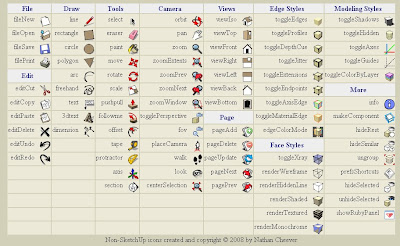
The following image shows the buttons available for use in your own toolbars.
* Updated for small bug in placement in SketchUp 8.
toolbars-2010-09.zip
This is an update to Custom Toolbars plugin with the missing icons replaced. I must thank Nathan Cheever for his hard work on these icons.
This Plugin allows you to build your own customized Toolbars. Creating a Toolbar is easy; Custom Toolbars creates a "Toolbars" folder in your SketchUp Plugins folder. Create a .txt file in this Toolbars folder and give it the same name as you want the name of the Toolbar. Then, edit the .txt file and simply list the name of the tool you would like to appear in the Toolbar.
See the examples .txt file in the Toolbars folder.
This plugins needs to be enabled from the Preferences > Extensions Dialog. Toolbars are available in the View > Toolbars menu.
Example Toolbars
There 3 example toolbars available when you install the plugin:


The following image shows the buttons available for use in your own toolbars.

Subscribe to:
Posts (Atom)
Popular Posts (Last 30 Days)
-
 Sketchup materials library of 12x12 vinyl floor tiles. Download download
 -
This SketchUp script assists the user in flattening, or unfolding, 3d objects onto a 2d plane. Installation Download unfoldtool.zip . M...
-
 Apr 2014 * Renamed to MoveIt , and available in t SketchUcation Plugin Store Aug 16, 2009 * Released update fixing possible bugsplat...
 -
Dec 18, 2010 - TIG just released a new .obj exporter. TIG's plugins are usually solid, so I recommend trying TIG's. ( TIG's OBJe...
-
 2010-09 * Updated for small bug in placement in SketchUp 8. toolbars-2010-09.zip This is an update to Custom Toolbars plugin with t...
 -
 This is the first step in a greeble plugin. And by first step I mean there are possible bugs. Protrude performs 4 basic operations: div...
 -
 The Construction Line Tool allows you to draw constructions lines in a similar way as the Pencil Tool. Toolbar: View > Toolbars >...
 -
 This importer lets you import both ASCII and binary STL files into SketchUp. It automatically detects the type of .stl file and imports acc...
 -
 Updated Dec 26, 2010 What are Plugins Beginning with version 4, SketchUp has shipped with an embedded Ruby-language interpreter allowi...
 -
 Update Apr 2014 - Version 1.0.1 Add a Layer to your SketchUp model and control its visibility on existing and new Scenes. Use Activa...