If you haven't heard, the SCF have been moved (announcement) to a new address.
Please register at the new board using the same username and email address. New posts and replys have been disabled at the old board.

My SketchUp Plugins list, and blog about the world of plugins for SketchUp.

Plugin: Export Outliner
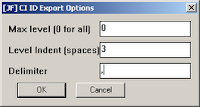
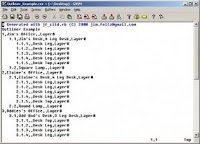
I wrote this for a specific type of output; something called CI ID (or something.) This plugin exports the outliner to a text file.
Download the script.
The Outliner:
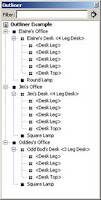
The User interface
The Output.
Download the script.
The Outliner:

The User interface

The Output.


Plugin: Protrude

This is the first step in a greeble plugin. And by first step I mean there are possible bugs.
Protrude performs 4 basic operations: dividing, offsetting, protruding, and tapering.
- Select the face(s) you would like to protrude.
- Divide them, if applicable. Only rectangles are able to be divided. Division occurs parallel to short side.
- Use the Set reasonable values to set the offset, protrude and taper values to something reasonable.
- Press Protrude to see the reults.
- Edit values, and hit Do Over to re-do the most recent operations.
- If the right-side input columns are used, a random number is generated for the operation. This number is in the range of left-column to right-column. Leave them blank if you don't want a range. (Sorry, it's the law. Just kidding, just a
bugfuture enhancement opportunity.)

You should completely delete both the protrude folder and protrude.rb file from your Plugins folder before installing this version.
Download jf-protrude_2015-12-06.rbz *
Updated Unfold Plugin
After a report of bad behavior, I've updated the unfold plugin. I have not changed the way it works, so no one should notice the changes.
You should, however notice the new support for undo - when you hit Undo, the selection set will be updated to reflect the undo operation. However, it sometimes gets confused.
Let me know how it goes.
You should, however notice the new support for undo - when you hit Undo, the selection set will be updated to reflect the undo operation. However, it sometimes gets confused.
Let me know how it goes.
Sherwin-Williams Palettes
This is a materials library created from these S-W models found in the 3DW.
Installation
1. Download.
2. Unzip the sw.zip file.
3. Move the Sherwin-Williams folder to your SketchUp/Materials folder.
Installation
1. Download.
2. Unzip the sw.zip file.
3. Move the Sherwin-Williams folder to your SketchUp/Materials folder.

Subscribe to:
Posts (Atom)
Popular Posts (Last 30 Days)
-
 Sketchup materials library of 12x12 vinyl floor tiles. Download download
 -
This SketchUp script assists the user in flattening, or unfolding, 3d objects onto a 2d plane. Installation Download unfoldtool.zip . M...
-
Dec 18, 2010 - TIG just released a new .obj exporter. TIG's plugins are usually solid, so I recommend trying TIG's. ( TIG's OBJe...
-
 Apr 2014 * Renamed to MoveIt , and available in t SketchUcation Plugin Store Aug 16, 2009 * Released update fixing possible bugsplat...
 -
 2010-09 * Updated for small bug in placement in SketchUp 8. toolbars-2010-09.zip This is an update to Custom Toolbars plugin with t...
 -
 The Construction Line Tool allows you to draw constructions lines in a similar way as the Pencil Tool. Toolbar: View > Toolbars >...
 -
 This is the first step in a greeble plugin. And by first step I mean there are possible bugs. Protrude performs 4 basic operations: div...
 -
 Updated Dec 26, 2010 What are Plugins Beginning with version 4, SketchUp has shipped with an embedded Ruby-language interpreter allowi...
 -
 This importer lets you import both ASCII and binary STL files into SketchUp. It automatically detects the type of .stl file and imports acc...
 -
 Update Apr 2014 - Version 1.0.1 Add a Layer to your SketchUp model and control its visibility on existing and new Scenes. Use Activa...