This is a materials library created from these S-W models found in the 3DW.
Installation
1. Download.
2. Unzip the sw.zip file.
3. Move the Sherwin-Williams folder to your SketchUp/Materials folder.

My SketchUp Plugins list, and blog about the world of plugins for SketchUp.


Plugin: ldraw.rb
The ldraw.rb can import ldraw.org .dat files.
The ldraw format does not lend itself well to SketchUp. In a nutshell, ldraw was developed at a time when parts were created in a text editor by hand. So to make that easier, dozens (if not hundreds) of primitives were created upon which parts were built. So when you load an ldraw part into SketchUp, the parts are pretty heavy with nested components and duplicate edges. I might add an option to "explode primitives." That would create a single component per part, and take care of duplicate edges.
Another major problem is face orientation. Faces are drawn arbitrarily facing in or out.
Yet, if you need a complex part that already exists in ldraw, this plugin can be a time saver.
Download ldraw.rb
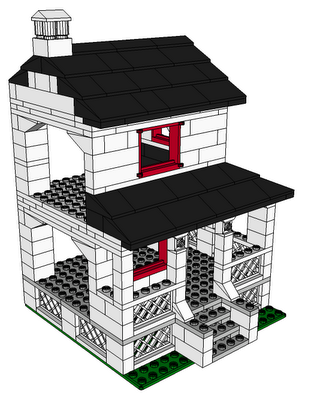
House With Porch by Jeff Stebel
The ldraw format does not lend itself well to SketchUp. In a nutshell, ldraw was developed at a time when parts were created in a text editor by hand. So to make that easier, dozens (if not hundreds) of primitives were created upon which parts were built. So when you load an ldraw part into SketchUp, the parts are pretty heavy with nested components and duplicate edges. I might add an option to "explode primitives." That would create a single component per part, and take care of duplicate edges.
Another major problem is face orientation. Faces are drawn arbitrarily facing in or out.
Yet, if you need a complex part that already exists in ldraw, this plugin can be a time saver.
Download ldraw.rb

House With Porch by Jeff Stebel
Sidetracked: formToArray.js
I was going to work on greeble.rb today, but I got sidetracked - sidetracked in a good way, though.
The options for a decent greeble plugin could be quite long. I started thinking about how to get all the options from a WebDialog to the plugin. I ended up coding up a way to pass an entire HTML form to a script, and create an options hash from the string.
There's 2 parts; the javascript method, and the ruby method. The javascript loops through the html form, building an array of strings in the form "key=value". The array is joined, and passed to SU-Ruby using the window.location= method. The ruby part parses the string and builds a hash from it. It sounds simple in retrospect, but it was a learning experience for me.
I'll post it when I have time to test it in use.
The options for a decent greeble plugin could be quite long. I started thinking about how to get all the options from a WebDialog to the plugin. I ended up coding up a way to pass an entire HTML form to a script, and create an options hash from the string.
There's 2 parts; the javascript method, and the ruby method. The javascript loops through the html form, building an array of strings in the form "key=value". The array is joined, and passed to SU-Ruby using the window.location= method. The ruby part parses the string and builds a hash from it. It sounds simple in retrospect, but it was a learning experience for me.
I'll post it when I have time to test it in use.
Plugin: WebConsole

2010-05-22
* Eliminated the Results textarea in favor of SketchUp's Ruby Console.
* Automatic resize of the code textarea.
* Changed button elements in favor of button-like span elements.
* Added ShowRC button to show the Ruby Console.
* Added hidden Help div
* Added code indenting using rbeautifyer.rb (http://www.arachnoid.com/ruby/rubyBeautifier.html)
* Code indentation is maintaned when snippets are saved and loaded.
* RubyRC clears the Ruby Console if rubyCons.exe is installed (http://sites.google.com/site/morisdov/)
* Push code to model - saves the code as a model attrobute.
(easilyshare code along with a model)
* Pull code from model - pulls code from moel attribute if it exists.
About
WebConsole is a WebDialog to test code snippets in. Enter your code in the console window, then press Exec. Load and Save buttons are provided for persistent storage of your snippets.
Installation
- Download webconsole.zip.
- Unzip the files and move them to your SketchUp/Plugins folder.
If you already have a favorite editor, you're best bet is to set it up to use the Sketchup Bridge plugin.
libsk.rb
I'm going to (have) start putting together a library of (hopefully) useful Ruby/SketchUp helper methods. Maybe called sk.rb, or libsk.rb.
I want to organize it in a way so that a user can require the entire lib, a subset of it, or an individual part of it. I think it can be organized into folders and sub-folders. For example, take Group.moveto() . Here is an example folder layout and usage:
And here is the example usage:
Thoughts?
I want to organize it in a way so that a user can require the entire lib, a subset of it, or an individual part of it. I think it can be organized into folders and sub-folders. For example, take Group.moveto() . Here is an example folder layout and usage:
*/Plugins/
   sk.rb
   sk/
       groups.rb
       groups/
           moveto.rb
And here is the example usage:
You can download an example help file.
# require everything.
require "sk.rb"

# include everything in the groups folder only.
require "sk/groups.rb"

# include only the moveto method in the groups folder.
require "sk/groups/moveto.rb"
Thoughts?
Subscribe to:
Posts (Atom)
Popular Posts (Last 30 Days)
-
 Sketchup materials library of 12x12 vinyl floor tiles. Download download
 -
This SketchUp script assists the user in flattening, or unfolding, 3d objects onto a 2d plane. Installation Download unfoldtool.zip . M...
-
Dec 18, 2010 - TIG just released a new .obj exporter. TIG's plugins are usually solid, so I recommend trying TIG's. ( TIG's OBJe...
-
 2010-09 * Updated for small bug in placement in SketchUp 8. toolbars-2010-09.zip This is an update to Custom Toolbars plugin with t...
 -
 This is the first step in a greeble plugin. And by first step I mean there are possible bugs. Protrude performs 4 basic operations: div...
 -
 The Construction Line Tool allows you to draw constructions lines in a similar way as the Pencil Tool. Toolbar: View > Toolbars >...
 -
 Apr 2014 * Renamed to MoveIt , and available in t SketchUcation Plugin Store Aug 16, 2009 * Released update fixing possible bugsplat...
 -
 This importer lets you import both ASCII and binary STL files into SketchUp. It automatically detects the type of .stl file and imports acc...
 -
As you probably know, SketchUp 8 Free does not include the ability import/export DXF/DWG files. Although there are some free and commercia...
-
 Updated Dec 26, 2010 What are Plugins Beginning with version 4, SketchUp has shipped with an embedded Ruby-language interpreter allowi...